Real Light Leaks: Why Camera Leaks Beats Digital Fakes
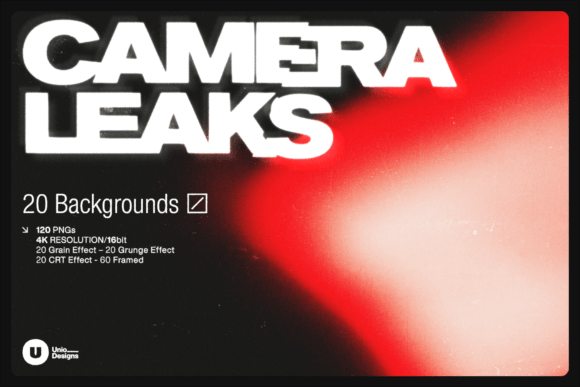
There is a specific quality to light that software struggles to replicate. It is the way light bends through a slightly imperfect lens, the subtle warmth of a flare washing out an exposure, or the soft, organic color bleed that happens when the camera’s mechanics fail slightly. Camera Leaks — 4K Light Leak Backgrounds captures these moments authentically. Unlike assets generated by AI models or constructed through heavy Photoshop layering, this collection was shot entirely with a DSLR. This distinction matters because it preserves the physics of light, offering a tactile, analog feel that digital simulations often miss.
The Anatomy of Authentic Optical Leaks
When we talk about Camera Leaks, we are discussing a set of design assets that prioritize texture and realism. The collection includes 20 distinct backgrounds, but the total utility comes from the 120 variants provided. Understanding these variants is key to integrating them into your workflow. The creators have dissected the raw camera captures into four specific visual styles to suit different project requirements.
- Grain Versions: These are essential for anyone looking to achieve a retro aesthetic. The grain here is not a generic overlay; it is integrated with the light leak, mimicking the look of expired film stock. This is ideal for music videos or indie brand identities where a vintage vibe is the goal.
- Grunge Versions: For projects that need a bolder, more distressed look, the grunge variants add grit. These work exceptionally well for title design in action sports, edgy fashion lookbooks, or high-impact social media graphics that need to stop the scroll.
- CRT/Glitch Versions: These tap into the Y2K and vaporwave aesthetics that are currently influencing modern typography and motion graphics. The digital distortion effects are perfect for tech-driven intros, YouTube overlays, or album covers that play with the concept of broken technology.
- Framed Versions: These are perhaps the most versatile for print and editorial design. They feature natural vignetting that draws the eye to the center of the composition. If you are designing a poster, a book cover, or a structured title screen, the framed versions provide an immediate focal point without cluttering the edges.
The resolution is another critical factor. At 3840 x 2160 px (4K), these backgrounds hold up in professional broadcast environments. They are rendered in 16-bit PNG format, which means the color gradients are incredibly smooth. You won't see the banding or "stepping" in color transitions that often plagues lower-quality assets. This high bit-depth allows for heavy color grading in tools like DaVinci Resolve or Premiere Pro without the image breaking apart.
Integrating Leaks into Modern Brand Identity
As a designer or brand strategist, you know that brand identity is built on consistency and emotion. Camera Leaks offers a shortcut to establishing a specific mood. The color palette included in the pack—ranging from deep reds and blues to ethereal purples and greens—allows for a wide range of emotional directions.
For a music video or a podcast intro, using a "Grunge" or "Grain" variant can immediately signal to the audience that the content is raw, authentic, or artistic. In editorial design, such as a magazine spread or a blog header, a subtle "Framed" light leak can add depth to a flat image, making the layout feel more premium and three-dimensional.
Consider the application in social media graphics. Platforms like Instagram and TikTok are saturated with clean, digital perfection. A touch of organic light leak texture can make a static image feel like a captured moment. It adds a layer of visual hierarchy without competing with the text. For example, placing a soft blue leak behind white typography can improve readability while adding a stylistic flair that generic backgrounds lack.
Practical Application for Creators and Marketers
The utility of Camera Leaks extends beyond just "pretty backgrounds." For small business owners and marketers, these assets solve the problem of looking "stock." A common issue in DIY marketing is the use of generic backgrounds that make a brand feel impersonal. By overlaying a camera leak, you transform a standard product shot or a corporate headshot into something with character.
Here is how to approach using these assets effectively:
- Blending Modes are Your Best Friend: Do not just place the leak on top of your footage. In Premiere Pro, After Effects, or Photoshop, experiment with blending modes like Screen, Lighten, or Overlay. "Screen" is usually best for light leaks, as it removes the black background and leaves only the light and color.
- Match the Mood to the Message: If you are designing for a wellness brand, stick to the softer pinks and warm oranges. If you are creating a tech startup's launch video, the CRT/Glitch versions with cooler blues and greens will align better with the industry's visual language.
- Opacity Control: A little goes a long way. For professional logo design or clean layouts, keep the opacity of the leak low (10-30%). This adds texture without obscuring the focal point. For intros or title screens, you can be more aggressive with the opacity to create a dramatic entrance.
- Color Grading Synergy: Use the color of the leak to support your color grading. If your footage is leaning towards a teal-and-orange grade, use a leak that reinforces those tones. This creates a cohesive visual experience rather than a disjointed overlay.
Why "Real" Matters in Digital Design
In an era where AI-generated textures are becoming common, there is a growing appreciation for assets that have a verifiable origin. Camera Leaks appeals to the creative professional who values authenticity. The subtle imperfections—the slight shifts in focus, the dust particles caught in the light—are the details that make the human eye perceive an image as "real."
For filmmakers and videographers, this collection is a bridge between digital precision and analog charm. Even if you shoot on the latest 4K digital cinema camera, adding these leaks in post-production can make the footage feel like it was shot on 16mm or 35mm film. This is a stylistic choice that can elevate a corporate video into a brand film, or a simple product demo into a lifestyle advertisement.
Ultimately, Camera Leaks — 4K Light Leak Backgrounds is a versatile toolkit. It serves the hobbyist making a family montage just as well as it serves the agency designer working on a national campaign. It provides the raw material—high-resolution, authentically captured light—that allows you to focus on the creative direction rather than struggling to fabricate realism from scratch.